


AI Form Builder
With Built-in Email Automation
Generate branded multi-step forms with AI, qualify leads with scores and logic, and automatically send personalized email sequences based on every answer.


Your form builder, email automation and CRM in one subscription

Chat with the AI Agent to build & optimize forms in seconds
Describe the form and the AI Agent builds it: step flow, fields, conditional logic, scoring rules, copy, and design. Refine any part with a follow-up prompt. No learning curve, no coding.
Discover the AI Agent
Connect the form directly to the follow-up journey
Most form builders stop at the submission. involve.me automatically sends personalized email sequences that branch on answers, scores, opens, and clicks, all in one subscription. No separate email tool required.
Learn more about automated emails
Send qualified lead data to the tools you already use
50+ native integrations, including HubSpot, Salesforce, ActiveCampaign, Brevo, Mailchimp, Klaviyo, and Pipedrive. Every submission arrives with field answers and segment attached. Zapier and webhooks handle the rest.
Discover our integrations
Score, segment, and route every lead
Lead scoring routes each respondent to the right next step, from a consultation booking to a personalized offer. Conditional logic, logic jumps, and OTP verification on email and SMS block junk submissions and qualify every lead before sales sees them.
Learn more about lead qualification
Built-in CRM, not just a submissions table
Every form submission creates a contact record with mapped properties, answers, and segments attached. Filter, tag, build dynamic segments, and trigger email sequences directly from the contact view.
Learn more about the CRM
Track form performance and improve with AI Insights
Track submissions and spot drop-offs step by step in the built-in dashboard. AI Insights surface what to fix and what to test next. Run A/B tests on fields, questions, and design to keep improving completion rate.
Learn more about AI Analytics
Collect payments securely without leaving the form
Accept payments inside any form with native Stripe, PayPal, and Square integrations, whether one-time charges or recurring subscriptions. Trigger email sequences on payment events.
Popular form use cases


-
Generate conversion-focused lead capture forms that deliver your whitepaper, e-book, or guide instantly to a visitor's inbox. Capture qualified leads, segment them by fit and intent, and trigger a personalized welcome sequence so every download turns into an ongoing conversation.
-
Build qualification and meeting scheduling forms for financial advisors, coaches, consultants, real estate agents, mortgage brokers, and other high-ticket service businesses. Route qualified prospects to your calendar and nurture the rest with automated email sequences until they are ready to talk.
-
Speed up price quote requests, demo requests, and discovery inquiries. Capture the data your sales team needs, qualify with logic and scoring, and start a personalized email sequence the moment the form is submitted.
-
Run a multi-step intake form that asks the right qualification questions upfront: goals, situation, budget, timeline, decision stage. Score leads by fit and intent, send a personalized next-step recommendation, and trigger the email sequence built for their segment.
-
Attract better candidates with multi-step job application forms that score applicants on their answers, route them to outcomes aligned with their qualifications, and automatically follow up at every stage of the hiring funnel.
-
Ask visitors a few questions and collect contact details in exchange for prizes, freebies, or discounts. Segment new leads by their answers, then trigger personalized welcome sequences instead of dropping every entrant into the same generic list.
Popular form use cases
Lead Capture Form
Generate conversion-focused lead capture forms that deliver your whitepaper, e-book, or guide instantly to a visitor's inbox. Capture qualified leads, segment them by fit and intent, and trigger a personalized welcome sequence so every download turns into an ongoing conversation.
Appointment Form
Build qualification and meeting scheduling forms for financial advisors, coaches, consultants, real estate agents, mortgage brokers, and other high-ticket service businesses. Route qualified prospects to your calendar and nurture the rest with automated email sequences until they are ready to talk.
Quote Request Form
Speed up price quote requests, demo requests, and discovery inquiries. Capture the data your sales team needs, qualify with logic and scoring, and start a personalized email sequence the moment the form is submitted.
Client Intake Form
Run a multi-step intake form that asks the right qualification questions upfront: goals, situation, budget, timeline, decision stage. Score leads by fit and intent, send a personalized next-step recommendation, and trigger the email sequence built for their segment.
Job Application Form
Attract better candidates with multi-step job application forms that score applicants on their answers, route them to outcomes aligned with their qualifications, and automatically follow up at every stage of the hiring funnel.
Giveaway Form
Ask visitors a few questions and collect contact details in exchange for prizes, freebies, or discounts. Segment new leads by their answers, then trigger personalized welcome sequences instead of dropping every entrant into the same generic list.
What customers say about the involve.me form builder
How to make a form with AI, in 3 steps
-
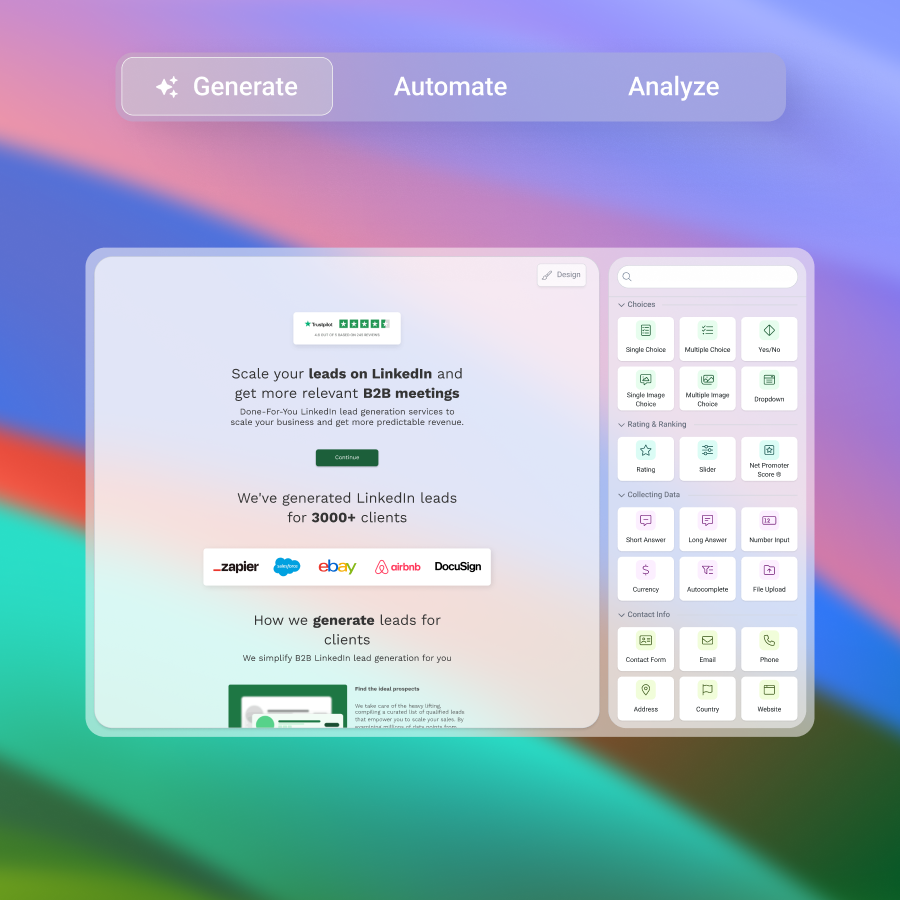
01 Generate & Fine-Tune
Generate a branded multi-step form from a prompt with the AI Agent. Fine-tune conversationally with the AI Agent or with the drag-and-drop editor, then embed on any website, trigger as a pop-up, or publish as a landing page on your custom domain, SSL included.
-

02 Automate Emails
Trigger personalized email sequences from any form submission. Use AI to draft email copy fast, then customize delays, branching, and conditions in the visual workflow builder.
-

03 Analyze & Optimize
Track form and email performance in the built-in dashboards. AI Insights surface what's working and where leads drop off. Run A/B tests on fields, questions, and designs to keep improving.
Native Integrations
Connect your form to your favorite apps


Powerful Toolbox
Build much more than simple forms
Answer Piping
Personalize follow-up questions using previous participant answers and data.
Individual Scoring
Assign positive or negative values to each answer and use them in formulas.
Logic Jumps
Guide users to different pages & questions depending on what they answer.
OTP Verification
Only accept submissions with valid email addresses and phone numbers.
Formula Builder
Easily create formulas with Excel-type functions, VLOOKUP engine and conditional logic.
Hidden Fields
Save data from the URL, pipe values to the text and prefill or hide personal data fields.
Personalized AI Text
Let AI create individual text feedback for your users from custom prompts.
Many More Features
Explore all of our features.
Free form templates
Get started with a form template
Generate a form from scratch with the AI Agent, or start with a template and customize the design, fields, scoring, and email sequence to match your brand.




SOC 2® Type 2 audited and GDPR-compliant by design


What is a dynamic form?
A dynamic form is an online form that changes in real time based on who the user is and how they answer. Instead of showing the same questions to everyone, dynamic forms use rules (often called conditional logic or branching logic) to show, hide, skip, or reorder fields and steps so people only see what is relevant. You will also see dynamic forms described as smart forms, interactive forms, or adaptive forms, depending on the product and context.
Dynamic forms vs online forms
An online form is any web-based form that collects and sends data through a browser to a system (a database, CRM, or email inbox). A dynamic form is a more advanced type of online form that adds personalization and automation through logic, prefill, and behavior-based routing. All dynamic forms are online forms, but not all online forms are dynamic.
involve.me works as a dynamic form builder and interactive form builder: a dynamic form creator where fields, questions, logic, and outcomes adapt to each respondent in real time, instead of showing everyone the same static form.
Difference with paper forms
The key difference between a dynamic online form and paper alternatives is speed and adaptability. Paper forms require manual handling and manual data entry. Dynamic online forms capture information instantly, validate it as users type, and can automatically route submissions into connected tools without extra steps. The digital approach eliminates many traditional bottlenecks in data collection and processing.
When people use an online form, they interact with HTML elements like text boxes, dropdown menus, checkboxes, and radio buttons. Each element captures a particular kind of information. Pressing submit sends the completed data to a server, where it can be processed and stored in a database for later use.
Difference with offline digital forms
What sets dynamic online forms apart from offline digital files (Word or PDF forms) is that they can react to inputs and connect to live systems. Offline files may collect data, but they rarely support real-time personalization, automated workflows, or clean integration into CRMs and databases without manual work.
What makes a form "dynamic"?
Dynamic forms usually combine several capabilities:
Conditional logic (branching logic): If a user selects an option, the form shows the next relevant question or skips sections that do not apply.
Progressive profiling: Dynamic forms collect data over time across multiple interactions, asking for new details only when earlier basics are already known, keeping forms short while improving lead intelligence.
Smart fields and prefill: Known visitors see fewer repetitive questions because the form uses previously captured values (cookies, UTMs, CRM records) and requests only what is missing.
Answer piping and personalization: The form reuses earlier answers (name, product, location) to personalize later questions and confirmation pages, making the experience feel tailored.
Multi-step flow and progress cues: Dynamic forms often use multi-step pages with progress indicators to reduce overwhelm and increase completion.
Lead scoring and routing: Dynamic forms can attach a score to each answer, segment respondents in real time, and decide which outcome page, follow-up sequence, or team gets the lead.
What is an AI form generator?
An AI form generator is a feature found in modern form builders that turns a plain-English prompt into a working form. Instead of dragging fields onto a canvas one by one, the user describes the form they need, and a large language model generates the field structure, the question copy, the validation rules, and often the design and routing logic.
AI form generators usually cover the most common form patterns: lead capture, contact, intake, application, quote request, registration, feedback. Some also generate multi-step flows with conditional logic and scoring rules from the same prompt, which moves the output from a simple form into a small qualification funnel.
The category is still maturing. Early AI form generators produced single-step forms with a generic look. The current generation handles branded multi-step layouts, conditional logic, scoring, and personalization, and lets the user refine the output conversationally after the first draft.
How does an AI form builder work?
Under the hood, an AI form builder interprets the prompt to identify three things: the form's purpose (what is it collecting and why), the audience (who is filling it in), and the structure (how many steps, what fields, whether scoring is needed). It then drafts each element using a mix of generative text and template-based layout, applies the brand styling, and outputs a working, editable form.
A good AI form builder does three things well:
Asks the right questions for the job. A lead capture form for a B2B SaaS asks different qualification questions than an intake form for a med spa.
Builds the logic, not just the fields. Conditional branches, scoring rules, and routing logic get generated alongside the questions, so the form is functional from the first draft, not just a layout.
Stays editable conversationally. The user should be able to ask for a change (rewrite a question, add a field, adjust a scoring weight, redesign the look) and see the form update without reopening the drag-and-drop editor.
AI form generation is becoming the default starting point in the category because it solves the slowest part of form building: the blank-page problem. A first draft generated in seconds is much easier to edit than a form built from scratch.
AI form generator vs. traditional form builder
A traditional online form builder, sometimes called a form maker or form creator, is a drag-and-drop canvas. The user picks fields, sets validation rules, configures logic by hand, and styles the form to match the brand. Plenty of these tools are free: a free form builder or free form creator covers basic data collection. The output quality depends entirely on the time and skill the user invests.
An AI form generator front-loads the work. The user describes what they need, the AI generates a working first draft, and the drag-and-drop editor is used to refine. The two are not actually opposites: most modern form builders include both, and the choice is which mode to start in.
Where the AI route adds the most value:
Multi-step forms with conditional logic. Mapping branches by hand is slow. AI generates a working flow that the user can prune.
Qualification and scoring. Setting scoring weights from scratch is finicky. AI gives a defensible starting point that the user adjusts.
Outcome pages with rich output. AI can generate result copy, recommendation logic, and visualizations (text recommendations, charts, gauges, scorecards) tailored to each respondent's answers, which is hard to do by hand at scale.
First drafts of any new form. Even when the user prefers manual editing, starting from a generated draft is faster than starting from a blank canvas.
Where the traditional route still wins: pixel-level design control, complex custom logic that the AI does not yet draft well on its own, and forms with very specific compliance constraints where every field needs deliberate handling. In practice, most users land somewhere in the middle: generate with AI, refine in the editor.
Unlike a standard online form builder that stops at collecting a submission, involve.me captures, qualifies, segments, and automatically sends personalized email sequences to each lead.
What are the main types of online forms? And what makes them dynamic?
The range of form types shows how versatile they are for different business needs. Each type can be dynamic when it adapts to the user and the context.
Intake forms
Intake forms collect structured information from a new client, patient, candidate, or prospect at the start of a relationship. They are common in professional services (legal, financial advising, coaching, consulting), healthcare, med spas, agencies, and any business with a discovery or onboarding step before delivery. A typical intake form asks about goals, current situation, budget, timeline, urgency, and contact details, then hands the information off to the right team or system.
Intake forms become dynamic when they branch based on the client's situation (new vs returning, service type, eligibility), score the response for fit and readiness, and route the lead automatically to the right next step, whether that is a consultation booking, a tailored proposal, or an email sequence built for their segment.
Lead capture forms
Lead capture forms exist to turn an anonymous visitor into a known contact. They typically gate something the visitor wants (a whitepaper, ebook, guide, template, free trial, discount, webinar replay) behind a short set of fields. The trade is explicit: give us your email and a few details, get the resource in return. They sit on landing pages, blog posts, sidebars, exit-intent popups, and inside content offers.
Lead capture forms become dynamic when they ask different qualifying questions based on the resource being downloaded, segment new contacts by fit and intent in real time, and trigger personalized welcome sequences instead of dropping every new lead into the same generic list.
Contact forms
Contact forms are the most common, the basic communication bridge between customers and organizations. They usually have text fields for names, emails, phone numbers, and a message box. Their simplicity makes them essential for any business that wants easy customer communication.
Dynamic contact forms: Contact forms become dynamic when they change follow-up questions based on intent (support, sales, partnership) and route submissions automatically to the right team.
Registration forms
Registration forms handle account creation and event signups, asking users for personal details and login credentials. They often include fields for names, addresses, passwords, preferences, and consent checkboxes.
Registration forms become dynamic when they show different fields based on account type, region, consent preferences, or role.
Survey and feedback forms
Survey and feedback forms collect opinions, reviews, and structured responses. They commonly use radio buttons, checkboxes, and text areas. The data helps businesses understand customer satisfaction and improve their offerings.
Survey and feedback forms become dynamic when follow-up questions depend on earlier answers, for example asking "why?" only after a low satisfaction score.
Order forms
Order forms support e-commerce, with product selectors, quantity fields, and payment sections. These forms must ensure secure data transmission and integrate cleanly with payment processing.
Order forms become dynamic when pricing, product options, shipping fields, or add-ons change based on selections.
Application forms
Application forms support job applications, loan requests, and membership submissions. They often require file uploads for documents (resumes, identification, proof of income) and long-form text fields.
Application forms become dynamic when eligibility questions decide which sections a user must complete and which documents are required.
Newsletter subscription forms
Newsletter subscription forms capture contact details and preferences for email marketing. Simple as they seem, they are key to building mailing lists.
Newsletter subscription forms become dynamic when they segment users by interests, language, or frequency preferences, without forcing everyone through the same long list.
Lead generation forms
Lead generation forms help sales and marketing teams identify potential customers by collecting contact information in exchange for valuable content or services. They balance information collection with user convenience to maximize conversion rates.
Lead generation forms become dynamic when they qualify leads with scoring and routing, and use progressive profiling to capture richer data over time.
Booking and reservation forms
Booking and reservation forms handle appointments and service scheduling, often incorporating date pickers and time selection tools to simplify the process for both businesses and customers.
Booking and reservation forms become dynamic when availability, required details, and confirmation steps change based on the selected service, time, or location.
What are the benefits of using dynamic forms?
Dynamic forms improve efficiency, accuracy, and customer experience in measurable ways.
24/7 availability and accessibility: Online forms are available any time, so users can submit inquiries, orders, or applications when it is convenient, regardless of time zones or office hours.
Higher completion rates: Thanks to conditional logic, users see fewer irrelevant questions, which reduces friction and drop-offs.
Better lead quality without longer forms: Progressive profiling helps collect richer data gradually, rather than demanding everything in one visit.
Faster routing and follow-up: Submissions trigger workflows and automations (notifications, CRM updates, assignments) immediately.
Personalized experiences at scale: Logic and answer piping create a tailored flow that feels 1:1, even when collecting thousands of submissions.
Enhanced data quality and validation: Real-time validation checks email format, required fields, and consistency before submission, preventing the incomplete or incorrect submissions common with paper forms.
Significant cost reduction: Moving from paper to online forms cuts costs across paper, printing, storage, and manual data entry. Automation reduces labor and lowers costly human errors.
Seamless integration and automation: Smart forms plug into CRMs, databases, and other tools, automating workflows and removing manual transfers.
Comprehensive analytics and reporting: Digital forms give insights into user behavior, completion rates, and form performance via built-in analytics. Track abandonment, submission times, and conversion rates to continuously optimize data collection.
Rapid processing and response: Instant data processing and automated responses significantly reduce the time from submission to action, boosting customer satisfaction and speeding decisions.
Scalable infrastructure: Online forms scale to handle more submissions without equal increases in resources. From dozens to thousands of submissions, performance stays consistent.
What are the essential dynamic form elements?
Knowing the key elements of effective online forms is essential to build tools that gather accurate data and offer a good user experience. Each element has a function and contributes to effective data collection.
Dynamic forms still rely on the same core building blocks as online forms, but they use them with logic and behavior rules.
Text input fields: The backbone of most online forms. Names, emails, phone numbers, short answers. Need clear labels and correct configuration so users know what format to enter.
Dropdown menus and selection controls: Predefined options that reduce data entry errors and standardize responses. Handy for locations, product choices, or any data that needs consistent answers.
Checkboxes and multiple choice options: Users pick multiple options from a list. Ideal for preferences, interests, or services of interest.
Radio buttons for exclusive selections: Restrict users to single selections from multiple options, ensuring mutually exclusive choices where only one answer is appropriate.
Text areas for extended responses: More room for longer responses, comments, or descriptions.
File upload capabilities: Users attach documents, images, or other files. Essential for applications that need supporting documents, portfolios, or file sharing.
Date and time selection tools: Date pickers and time selectors simplify collecting dates and times, cutting formatting errors common with manual entry.
Action buttons and controls: Submit buttons send the form for processing; reset buttons clear entries. Controls should be clearly labeled and strategically positioned.
Progress indicators for complex forms: Multi-step forms benefit from progress indicators that show how far users have come. Visual cues reduce abandonment and set clear expectations about form length.
What are the best practices for dynamic form design?
Designing effective forms means balancing functionality with user experience. The best dynamic forms minimize friction while maximizing data quality and completion rates.
Simplicity and field optimization: Top-performing online forms include only the fields necessary for the purpose. Every extra field raises the chance of abandonment.
Clear labeling and user guidance: Every form element needs clear, descriptive labels. Placeholder text can show example formats or give helpful hints. Clear guidance reduces frustration and improves data quality.
Start with the outcome, then design the logic: Define what you need to decide or route (qualification, segmentation, booking, onboarding), then map the minimum questions required to get there.
Logical organization and flow: Arrange fields in a logical order that feels natural to users. Group related items and order fields to match how users think about the process.
Use conditional logic to remove irrelevant fields: If a section does not apply, do not show it. Branch users cleanly instead of forcing "N/A" answers.
Use progressive profiling for repeat interactions: Keep the first touch lightweight (name, email), then rotate in deeper questions later (role, company size, timeline, use case).
Prefer multi-step for longer flows: Breaking a long form into steps with a clear progress indicator usually feels easier than one long page.
Mobile-first design approach: Forms must work well on all screen sizes. Bigger touch targets, simpler navigation, and layouts that fit small screens without losing features.
Real-time validation and error handling: Give immediate feedback when users enter invalid data. Error messages should be specific, useful, and placed near the affected fields.
Consistent visual design and branding: Online forms should match the website's design and brand. Consistent styles, colors, and type create a cohesive experience that builds trust.
Privacy and security communication: Include clear privacy notices and data protection statements so users trust sharing information. Transparency addresses privacy concerns and may be legally required.
Cross-platform compatibility testing: Test forms across different browsers, devices, and operating systems to ensure consistent functionality and appearance.
Security and privacy considerations
Because forms now collect more sensitive data, strong security and privacy protections are essential to maintain trust and meet changing regulations.
SSL encryption and data transmission: SSL encryption protects data as it moves between users' browsers and the server. A basic requirement for forms handling personal or sensitive data.
GDPR and privacy regulation compliance: GDPR and similar laws require explicit consent for data collection and clear information about how data is used. Forms need privacy notices and consent mechanisms that meet local legal standards.
Bot and junk submission protection: CAPTCHAs, OTP verification on email and SMS, and disposable-email blocking keep data quality high and prevent abuse. Modern approaches balance security and user experience.
Data backup and recovery procedures: Reliable backups keep form submissions available during system failures or disasters.
User consent and data processing transparency: Consent controls must explain what data is collected, how it will be used, and who it may be shared with. Users should be able to adjust or withdraw consent easily.
Regular security audits and updates: Regular security assessments find vulnerabilities and keep protections effective against new threats.
PCI DSS compliance: Forms that handle payments must follow PCI DSS rules. Use PCI-compliant processors and avoid storing sensitive payment data in-house whenever possible.
Industry-specific dynamic form applications
Financial services: Banks, insurers, mortgage brokers, and financial advisors use dynamic forms for account openings, loan applications, and quotes. Branching logic handles eligibility paths and validation reduces errors, while qualified leads feed straight into the CRM.
Real estate: Dynamic inquiry and rental application forms adjust questions based on buying vs renting, property type, or tenant profile, and request uploads only when needed. Submissions route to the right agent and sync to the CRM.
Coaching, consulting, and expert services: Coaches, consultants, and advisors use intake and discovery forms that score leads by fit and readiness, then route them to the right offer or call automatically.
Healthcare: Intake and appointment forms adapt based on symptoms, visit type, or whether the patient is new, keeping intake shorter and more accurate. Strict privacy requirements apply.
Education: Schools and course providers use dynamic forms for enrollment, course registration, evaluations, and parent-teacher workflows.
Human resources and recruitment: Job applications, onboarding, and reviews. Forms change by role, location, or employment type, collecting only the relevant details and documents.
E-commerce and high-consideration products: Retailers, DTC brands, and high-consideration product businesses (skincare, wellness, furniture, mattresses, B2B software) use dynamic forms for orders, returns, support, and guided product selection.
Event management: Event registration forms adapt based on ticket type, role (attendee, speaker, sponsor), and add-ons. Post-event surveys branch based on satisfaction to capture useful feedback without bloating the survey.
FAQs
-
The involve.me AI Form Generator is an AI-based form builder that automatically creates branded multi-step forms. Rather than manually designing form fields, layouts, and branding, you describe what you need in a prompt and the AI engine builds a fully functional, customizable form. The tool is built for businesses where every qualified lead is worth hundreds or thousands of dollars: high-ticket service providers (financial advisors, insurance brokers, real estate, solar, med spas), coaches and consultants, and high-consideration product brands. Every form comes with lead scoring, personalization, conditional logic, built-in email automation (on paid plans), and an analytics dashboard with AI-generated reports. From the first response to the final follow-up, involve.me handles capture, qualification, segmentation, and personalized email sequences in one subscription.
-
Yes. The AI Form Generator is included on every plan, including the free plan. You can generate a multi-step form with AI without paying. Plan tier decides how many live funnels, how many users, how many AI credits, and which advanced features (A/B testing, custom CSS, webhooks, OTP verification, custom domain) are available. AI credits are used for AI Insights reports and Personalized AI Text inside forms, not for the form generation itself.
Paid plans start at $29/month. Built-in email automation is available on any paid plan.
-
No. Describe the form you need and the AI Agent handles the layout, field types, logic, copy, and styling. If you want to refine the output, the drag-and-drop editor does the rest, no code required. Branded fonts, colors, corners, borders, and custom CSS (on higher tiers) are all configurable visually. The AI Agent can also tweak the design conversationally, so you can ask for a redesign without opening the editor at all.
-
Yes. The first AI draft is a starting point, not a final form. You keep full control over questions, fields, scoring rules, design, conditional logic, and outcome pages. Edit conversationally with the AI Agent (rewrite a question, add a field, adjust a scoring weight, redesign the look) or use the drag-and-drop editor for hands-on changes. Both work side by side.
-
Beyond AI generation, involve.me has:
- AI Agent. Builds and edits complete funnels through chat: flow structure, routing logic, copy, design, scoring rules, formulas, and full page layouts.
- Personalized AI Text. Writes unique outcome copy for every respondent based on their answers.
- AI Bulk Question Generation. Drafts lists of relevant questions for any form, quiz, or survey topic.
- AI Email Copy. Drafts entire email sequences and individual emails inside the workflow builder.
- AI Insights. Analyzes form submissions and generates downloadable reports with key findings, drop-off points, and recommendations.
- AI Formula Generation. Translates natural-language descriptions into working calculator and scoring formulas.
-
Yes. Every form is fully responsive out of the box and adjusts to phones, tablets, and desktops automatically. Touch targets, layouts, and field types are sized for mobile without any extra configuration. Forms render the same way whether they are embedded inside a website, triggered as a pop-up, or published as a standalone landing page on a custom domain, on WordPress, Webflow, Shopify, or any other platform.
-
Publish the form in involve.me and copy the embed snippet. Paste it into the relevant page on your site. You can embed inline inside any page, trigger as a pop-up (timed, scroll-based, or exit-intent), or skip the website entirely and use the standalone landing page URL with SSL included. Custom domains and white-labeling are available on higher plans.
-
Yes. Accept payments inside any form with native Stripe, PayPal, and Square integrations. Use it for one-time charges, recurring subscriptions, deposits, or pay-what-you-want pricing. Coupon codes (single-use and multi-use) are supported. Combined with built-in email automation, payment events automatically trigger receipt emails, onboarding sequences, fulfillment notifications, or upsell flows, all without leaving the form or stitching a separate ESP into the loop.
-
Yes, but for most use cases you will not need to. involve.me has a built-in CRM and built-in email automation, so the same subscription captures the lead, scores it, segments it, and sends the personalized email sequence.
When you do want to push data downstream, involve.me has 50+ native integrations including HubSpot, Salesforce, ActiveCampaign, Brevo, Mailchimp, Klaviyo, Pipedrive, Google Sheets, Slack, and most major CRMs and marketing tools. Per-funnel property mapping lets each form write data into the contact record on its own schema. Zapier and webhooks handle anything not natively supported.
-
Businesses selling high-value products or services that need to capture, qualify, and follow up with leads before purchase. This includes high-ticket service businesses (financial advisors, insurance brokers, legal services, real estate, mortgage, solar, med spas, education providers), expert-led businesses (coaches, consultants, advisors, course creators, assessment-based experts), and high-consideration product businesses (skincare, wellness, furniture, mattresses, B2B software, custom products).
-
involve.me takes over the follow-up automatically. Every submission creates a contact record in our built-in CRM, with mapped properties, answers, scores, and segments attached, then feeds into the visual workflow builder.
From there, set up personalized email sequences that branch on answers, scores, outcomes, opens, and clicks. A lead who scored high gets a different sequence than one who scored low. A lead who clicked the booking link gets a different sequence than one who did not. Payment events trigger their own flows. AI drafts the email copy fast.
You can also push leads into your existing stack via 50+ native integrations, Zapier, or webhooks. View, filter, tag, and segment every contact directly inside involve.me, and edit the workflows any time.
-
involve.me is the AI form builder with built-in email automation. Most form tools stop at capturing the lead. involve.me saves leads as contacts in the built-in CRM, then sends personalized email sequences automatically based on answers, scores, outcomes, opens, and clicks, inside the same subscription. Here is how it compares on the form-building dimension specifically:
Design flexibility. Custom fonts, colors, themes, backgrounds, and CSS for fully branded forms, far beyond the limited styling of most builders.
Integrations and payments. 50+ native integrations across CRM, email, analytics, and collaboration tools. Native Stripe, PayPal, and Square for one-time charges and subscriptions.
Analytics and reporting. Built-in A/B testing, completion rates, drop-off analysis per step, partial submissions, and AI Insights with actionable recommendations.
Dynamic logic. Conditional logic, logic jumps, answer piping, multi-variable formula scoring, and outcome routing for highly personalized flows.
Pricing value. Free plan with the AI Form Generator included. Paid plans from $29/month.
-
Data security is a top priority for involve.me. All forms (AI-generated or not) are hosted on secure servers and utilize SSL encryption for data transmission. You also retain full control over how collected information is stored and accessed. Any content (including your users) is 100% owned by you, we don't have permission to use that content or contact your users for any reason. Strict privacy settings can be configured to comply with various regulations like GDPR.
-
AI form generation makes it faster to launch new lead gen campaigns, especially for businesses where every qualified lead is worth hundreds or thousands of dollars. Each form is built to maximize completion rates and capture qualified leads through automated qualification and routing. Captured leads flow directly into built-in email automation, so personalized email sequences kick off the moment a form is submitted, without a separate ESP in the loop. Track results, identify drop-offs with the analytics dashboard, and refine with built-in A/B testing.
-
AI lead generation involves using artificial intelligence tools and algorithms to identify, attract, and qualify potential customers. Rather than relying on manual processes or guesswork, AI can analyze large datasets (like website interactions, social media engagement, or user behavior) to predict which leads are most likely to convert and which messaging will resonate best with each segment. This makes prioritizing qualified leads easier for marketing and sales teams. AI can also help increase conversion rates by delivering personalized content based on a visitor’s previous interactions or interests, for example.