

Most websites are built to serve many goals at once. They explain the product, showcase features, link to multiple pages, and speak to different audiences at the same time. While this works for brand awareness, it often weakens conversion. Visitors arrive, scroll around, get distracted, and leave without taking action.
This is where CRM landing pages play a critical role. Instead of trying to do everything, they are designed to do one job well: guide visitors toward a specific action and turn them into qualified leads. When combined with the right CRM setup, these pages help businesses move faster, respond better, and manage lead data more effectively.
In this article, you’ll learn how to:
Create custom landing pages and professional landing pages
Use page templates and landing page examples
Capture lead data without manual data entry
Convert traffic, visitors, and users into leads
Test, optimize, personalize, and launch high-converting pages
This guide is written for marketers, sales teams, and SaaS businesses that want more leads, better conversion, and cleaner CRM data.
What Is a CRM Landing Page?
A CRM landing page is a standalone web page that is directly connected to a CRM system and built with a single conversion goal in mind. Instead of acting as a general information page, it focuses on capturing visitor details through a form and sending that data straight into the CRM for immediate use.
Unlike a homepage or a full website page, a CRM landing page removes unnecessary navigation, external links, and competing messages. The layout, content, and call to action are all aligned around one offer, such as a product demo, a signup, or a lead magnet. This focused structure helps visitors understand what they are supposed to do without hesitation.
CRM landing pages are commonly used in lead generation campaigns, paid ads, email campaigns, and product demo flows. Because they are directly connected to the CRM, they eliminate manual data entry and ensure that every lead is captured, stored, and ready for follow-ups, segmentation, and automation.

Why CRM Landing Pages Matter for Lead Generation
CRM landing pages help businesses convert traffic into leads efficiently.
They allow teams to:
Convert visitors from ads, search, and links
Reduce manual data entry
Connect marketing, sales, and CRM systems
Improve follow ups and email campaigns
Because the messaging is focused, these pages outperform generic website pages in both conversion and lead quality.
Key Elements of a High-Converting CRM Landing Page
Clear Headline, Title, and Description
A high-converting CRM landing page starts with a clear headline and title that immediately explain what the page is about. When a visitor lands on the page, they should understand the offer within a few seconds without needing to scroll or think. The headline should align closely with the ad, search result, email link, or URL that brought the user there. This consistency reassures visitors that they are in the right place and reduces bounce rates.
The title and description should clearly describe the value of the offer rather than focusing on generic product features. When the message matches the user’s intent, engagement increases and confusion drops. Clear descriptions also help guide users toward the next step by setting expectations early, which plays a major role in improving overall conversion rates.
One Clear Action and a Strong Call to Action
Every CRM landing page should be designed around one clear action. Instead of presenting multiple choices, the page should guide visitors toward a single outcome, such as booking a demo, downloading a guide, starting a trial, or requesting a call. This focus reduces decision fatigue and makes it easier for users to take action.
A strong call to action reinforces this goal by clearly telling visitors what will happen when they click. The CTA should be visible as soon as possible, use action-oriented language, and stand out from the rest of the page visually. Repeating the CTA at logical points on the page helps capture users who are ready to convert at different stages. When a page combines one clear action with a strong, well-placed CTA, conversion rates increase significantly.
Lead Capture Forms That Convert
Lead capture forms are the most important part of a CRM landing page because they directly determine how many visitors turn into leads. Forms should only ask for information that is truly necessary at that stage of the funnel. Requesting too much data too early often discourages users from completing the form.
Research shows that every additional field in a form increases the likelihood of abandonment. This makes it essential to avoid unnecessary questions and focus on collecting relevant data such as name, email, or phone number. Multi-step forms can be especially effective because they break the process into smaller steps, reducing perceived effort and helping users commit gradually. This approach improves form completion rates while still capturing meaningful lead data for the CRM.
Social Proof and Trust Elements
Trust plays a major role in whether a visitor decides to convert. Social proof helps reduce uncertainty by showing that other users or companies have already benefited from the offer. Common trust elements include client logos, short case studies, reviews, and testimonials placed near the CTA or form.
Even a small amount of social proof can have a strong impact. Studies show that adding just five reviews can increase purchase likelihood by four times. These elements reassure prospects, validate the offer, and make the decision to convert feel safer and more justified.
High-Quality Images and Videos
Visual elements help visitors understand the offer faster and more clearly than text alone. Product screenshots, demo videos, and explainer visuals can show how the solution works and what users can expect after converting. This is especially important for CRM landing pages promoting product demos or tools.
High-quality images and videos do more than improve design. They directly influence performance. Research shows that using high-quality visuals can increase conversions by up to 86%. To be effective, images and videos should be displayed clearly, load quickly, and be optimized for web and mobile performance. When visuals support the message instead of distracting from it, they strengthen both engagement and conversion.
How to Create a CRM Landing Page
Here are some simple steps that you should follow to create a CRM landing page.
Step 1: Choose a Landing Page Builder That Connects to Your CRM
Start by picking a tool that helps you build pages fast and send lead data directly into your CRM. involve.me is the AI quiz funnel builder with built-in email automation. It builds conversion-focused CRM landing pages that capture leads, then automatically sends the follow-up email sequence and syncs the contact to your CRM through 50+ native integrations.
Step 2: Pick a Template That Matches Your Offer
Select a template that fits your goal, such as a product demo, lead magnet, or signup. A good template gives you a strong structure from the start, so you can focus on messaging instead of building everything from scratch.
Create your own landing pages
Get started with 300+ templates

B2C Lead Magnet Template

B2B Product Finder Template

B2B Lead Magnet Template
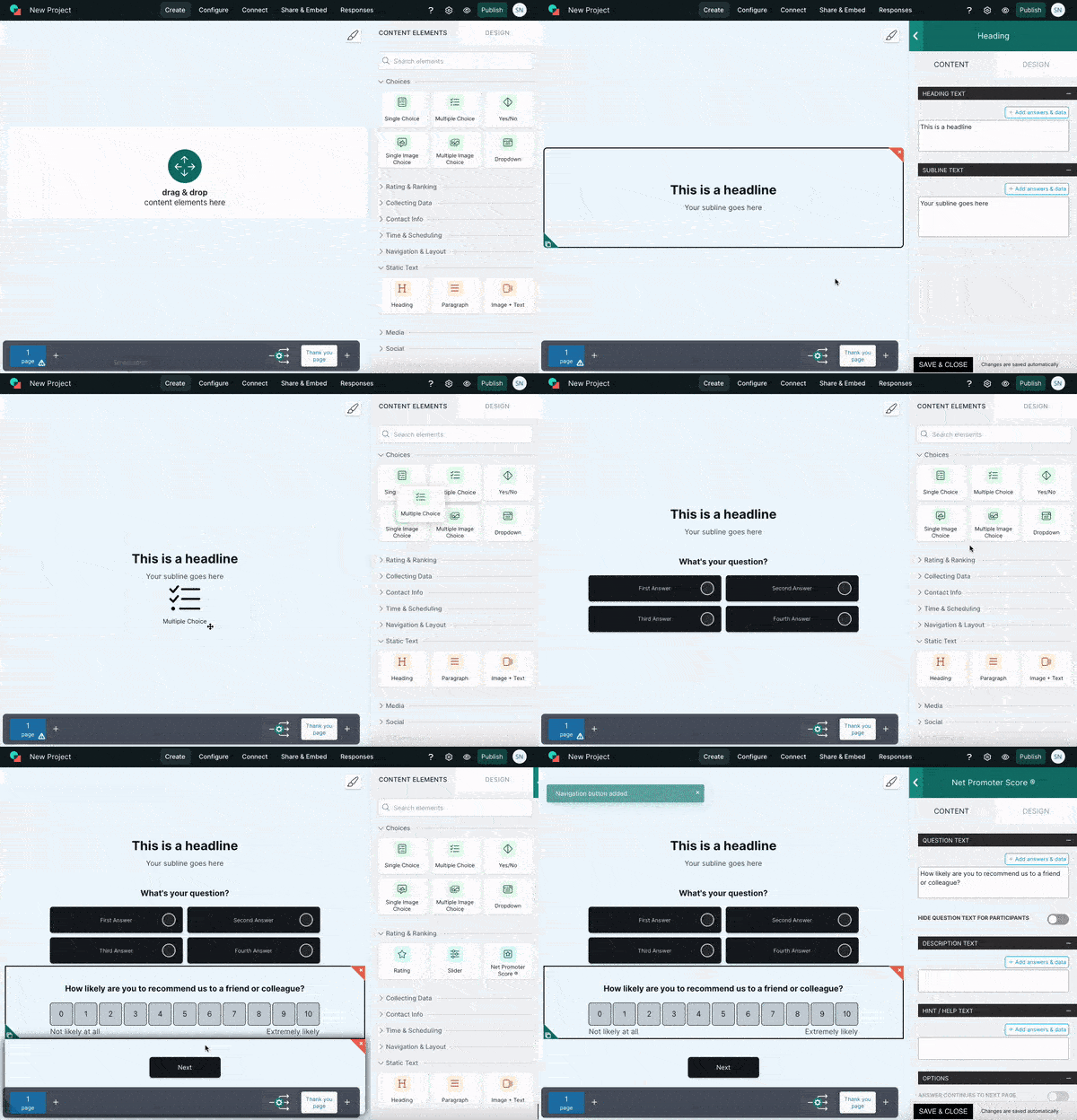
Step 3: Customize the Page Using a Drag and Drop Editor
Use a drag and drop editor to adjust sections, add your form, and place your key content where it will get attention. Keep the layout clean and focused so visitors know exactly what to do next.
Step 4: Write a Focused Message and Add a Strong CTA
Make sure your headline and supporting text highlight one offer and one outcome. Add a strong CTA above the fold and repeat it only where it makes sense, so the page stays clear and conversion-driven.
Step 5: Build a Simple Lead Capture Form
Keep your form short and only ask for the details you truly need. If you require more information, consider multi-step forms to reduce friction and improve completion rates.
Step 6: Ensure Mobile Optimization and Fast Load Speed
Check spacing, font size, and form usability on smaller screens and make sure mobile optimization is handled properly. A page that looks great on desktop but feels hard on mobile will lose conversions.
Step 7: Preview the Page Before Launch
Always preview the full page to check layout, CTA visibility, form behavior, and mobile view. This step helps you catch small issues before sending traffic.
Step 8: Publish and Start Tracking Results
Once everything is ready, publish the page and start driving traffic from ads, email campaigns, or search. Track conversions and test improvements over time to keep performance moving up.


CRM Landing Page Use Cases
CRM landing pages can be used across multiple marketing and sales scenarios to capture leads, organize data, and improve conversion rates. With no-code landing page builders like involve.me, teams can easily create, customize, and connect CRM landing pages to their workflows without technical effort.
Using CRM Landing Pages for Product Demos
CRM landing pages are commonly used to promote product demos because they create a focused path for interested users to request access. These pages are designed to capture key user details through a form and send the information directly into the CRM, allowing sales teams to follow up quickly and consistently.
By removing unnecessary distractions and links, demo-focused CRM landing pages make it easier for users who are already interested to take the next step. This reduces delays, prevents missed demo requests, and improves the overall demo-to-conversion process.
CRM Landing Pages for Lead Magnets
Another common use case for CRM landing pages is promoting lead magnets such as guides, reports, checklists, or downloadable resources. These pages allow businesses to exchange valuable content for contact details in a simple and structured way.
Because the lead data is stored automatically in the CRM, teams can segment users based on interest, personalize follow-up emails, and nurture prospects more effectively over time. This makes CRM landing pages especially useful for building email lists and supporting long-term lead generation strategies.
CRM Landing Pages for Ads and Email Campaigns
For paid ads and email campaigns, CRM landing pages act as a focused destination that closely matches the message users clicked on. This alignment between the ad or email and the landing page reduces confusion and increases the likelihood of conversion.
By connecting traffic sources directly to CRM data, these landing pages also make it easier to track performance, measure campaign effectiveness, and understand which channels are generating the highest-quality leads.
CRM Landing Pages in Marketing Funnels
CRM landing pages also play a central role in full marketing funnels. They help identify users at different stages of the customer journey, capture lead information efficiently, and store data in a structured format inside the CRM.
This setup allows marketing and sales teams to work with the same data, align follow-up efforts, and measure results more accurately across the funnel. As a result, CRM landing pages become a key building block for scalable and data-driven growth.
Final Words: Build High-Converting CRM Landing Pages With the Right Tool
A well-built CRM landing page helps convert visitors into leads, capture valuable data automatically, eliminate manual data entry, and improve follow-ups and overall conversion rates. When every page is focused on one clear action, teams can move faster and make better use of their traffic.
If you want to create, test, personalize, and optimize CRM landing pages without coding, involve.me gives you everything in one place: a visual drag-and-drop editor, high-converting templates, multi-step forms, built-in email automation that sends the follow-up sequence, 50+ native CRM integrations, and built-in analytics. Use it to launch and improve landing pages with confidence.
Start building CRM landing pages with involve.me and turn more traffic into qualified leads.
Get Started with Landing Pages
No coding, no hassle, just better conversions.
FAQs About CRM Landing Pages
-
CRM landing pages can capture leads even without a CRM connection. However, integration improves automation, follow-ups, data accuracy, and overall lead management.
-
A CRM landing page form should include as few fields as possible. Shorter forms reduce friction and consistently lead to higher conversion rates.
-
A homepage serves multiple goals and links to different pages across a website. A CRM landing page is focused on one clear action and is built specifically for lead capture and conversion.
-
Yes, removing navigation menus helps keep visitors focused on the primary action. This reduction in distractions can increase mid-funnel conversions by 16% to 28%.
-
Yes, landing pages can be personalized using CRM data such as location or behavior. Personalization makes pages more relevant and significantly improves engagement and conversion.